Code :# include
unsigned char huge Data[100001];unsigned char keystream[1001];int Rpoint[300];
void main(int argc,char *argv[]){ FILE *fd; int i,j; int size; char ch; char *name; int cracked; int sizemask; int maxr; int rsz; int pos; int Rall[300]; /* Resourse allocation table */
if(argc<2){ printf("usage: glide filename (username)"); exit(1); } /* Read PWL file */
fd=fopen(argv[1],"rb"); if(fd==NULL){ printf("can't open file %s",argv[1]); exit(1); } size=0; while(!feof(fd)){ Data[size++]=fgetc(fd); } size--; fclose(fd);
/* Find Username */ name=argv[1]; if(argc>2)name=argv[2]; printf("Username:%s",name);
/* Copy encrypted text into keystream */ cracked=size-0x0208; if(cracked<0)cracked=0;>1000)cracked=1000; memcpy(keystream,Data+0x208,cracked);
/* Generate 20 bytes of keystream */ for(i=0;i<20;i++){ ch=toupper(name[i]); if(ch==0)break; if(ch=='.')break; keystream[i]^=ch; }; cracked=20;
/* Find allocated resources */
sizemask=keystream[0]+(keystream[1]<<8); printf("Sizemask:%04X",sizemask);
for(i=0;i<256;i++){>maxr)maxr=Data[i]; } }
maxr=(((maxr/16)+1)*16); /* Resourse pointer table size appears to be divisible by 16 */
/*Search after resources */
Rpoint[0]=0x0208+2*maxr+20+2; /* First resources */ for(i=0;i
if(i
/* Decrypt resources */ for(i=0;i

Minute Pesronal Security Package (PSP) is a complete set of tools created to block viruses , worms ,hackers ,unauthorized users and other malicious application from entering your personal computer. PSP locks the computer system to external connections by analysis of network traffic and isolates, records, and warns the user of all hacking attempts. PSP includes an integral virus protection desinged to block both known computer viruses and unknown worms and other malicious application flowding the internet. PSP uses combination of several security techniques to provide its integrated protection. In addition to highly sophisticated personal firewall for controlling both incoming and outgoing traffic from your computer , PSP uses advanced malicious application detection system to proactively blocks worms and viruses and keep them out of your PC. The integration of personal firewall techonology in the application level , with its unique capabilities in detecting and blocking worms,viruses and malicious applications provides complete protection which is essential for any Internet user. you can free download Personal Security Package 7.3.1.1 now.
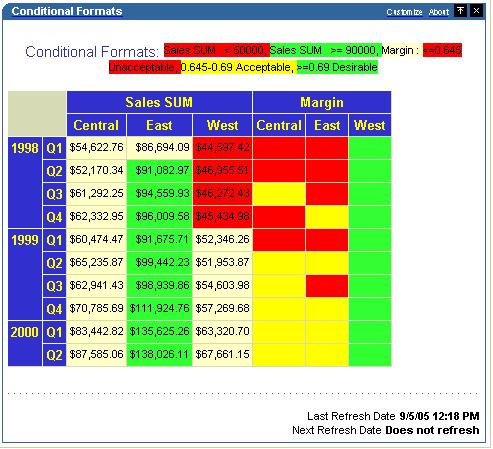
The Last Refresh Date/Time and Next Refresh Date-Time stamp that appears at the bottom right of every Discoverer portlet may not always be required by people, for a variety of different reasons. It can take up screen real estate; people don’t really care about this field and would rather not see it. For whatever reasons, it may not be required in all cases.
Removing it is relatively simple – provided you are willing to indulge in a little bit of UIX editing. Ok, so it not supported, nor would I advise you to go about hacking your way through UIX files. But, if you feel confident enough, this is a relatively simple exercise.
You can read my earlier post about UIX and the caveats that apply.This is a Discoverer worksheet portlet, with the date-time stamped at the bottom right corner.
If you want to remove this from the Discoverer worksheet portlet – i.e. if you do NOT want this value to appear on ANY Discoverer worksheet portlet, you have to modify one file. The file name is ‘show_worksheet.uix’ and is located under your Oracle home's \j2ee\OC4J_BI_Forms\applications\discoverer\discoverer\uix\worksheet folder. In my case, I am using the phase 2 release of the app server (10.1.2.0.2) (see earlier posts - 1, 2, and 3), and therefore Discoverer is installed in the same Oracle home as my app server.
Make a backup of this file BEFORE you do anything further
Note: This article is about targetting CLR version 1.1 with Whidbey Beta1. If you're interested in Beta2 see this article.
Jomo Fisher--MSBuild doesn't ship with a way to target CLR version 1.1. I discussed the reasons for this in a prior blog entry and I even said that I respected the decision given our resource limitations. On the other hand, respecting something and living with it is not the same thing so I decided to see exactly what it would take to target an older CLR.
My criteria were modest:
- I want reuse most of the existing build logic that ships with MSBuild. After all, this blog is about hacking the build, and throwing everything away and starting over didn’t seem in the spirit of things. (Plus it would be hard and I’m lazy).
- I wanted to build both Whidbey and CLR 1.1 binaries at the same time (in the same build gesture).
- I wanted to be able to compile at least minimal console applications, window applications and libraries.
- I wanted to keep Intellisense working and reflecting latest Whidbey libraries.
- I wanted to be able to call library code in other projects in the solution.
- I was willing to live with only C# support (at least for now).
- I didn't care too much about optimal rebuild or clean support (at least for now).
What I ended up is a .targets file that meets my goals and that you can use as a sample for how to target multiple platforms with MSBuild. Here are the steps for Whidbey Beta 1:
(1) Copy this sample into a file called C:\MyTargets\CSharp.SideBySide.Targets
(2) Create a new C# console application called MyApp.
(3) Build and see that there are no errors or warnings.
(4) Open up MyApp.csproj in notepad and replace the import tag near the bottom with,
(5) Save and exit from notepad.
(6) Return to VS and press “Reload” when prompted.
(7) Now “Rebuild” the console application.
At this point, if the build fails with a message like,
Properties\Settings.cs(13,9): error CS1518: Expected class, delegate, enum, interface, or struct
Then it’s working. This error is because the CLR 1.1 C# compiler doesn’t support partial classes. To get past this, you’ll need to delete the Settings.cs file. In the Solution Explorer click “Show All Files”. Now, in the Solution explorer you should see an entry called Settings.settings. Delete it and rebuild the project again.
At this point, the build should fail again with a message like,
Program.cs(4,26): error CS0234: The type or namespace name 'Generic' does not exist in the class or namespace 'System.Collections' (are you missing an assembly reference?)
This is because the old compiler didn’t support generics. You’ll need to delete this line,
using System.Collections.Generic;
from Program.cs and then build again. (As you can see, there are plenty of neat new features in the new compiler that you won't be able to use if you want to target the older framework.)
This latest build should succeed, and you should now have a bin directory that looks like this (in part):
bin\Debug\ConsoleApplication1.exe
bin\Debug(1.1)\ConsoleApplication1.exe
The first is the plain old Whidbey application. The second is a version that will run under the CLR version 1.1.
Please keep in mind that only the very basic scenarios have a chance of working. For example, I’m pretty confident that COM references are completely broken. If you try these targets out, let me know what you have problems with. If I can see a cheap, hack-the-build-worthy solution I’ll update the sample as I have the time.
Whidbey still won't ship with a way to target the 1.1 CLR but at least now there's starting point for doing it yourself.
In future entries, I will take apart the sample and explain how the various hacks pieces work.
Update : There is a newer version of this Hack that you might want to check out. Its much more simpler and can be done by almost everyone. The newer hack also includes Mac OSX 10.5.1 so please check out Hack Attack : Install Leopard On your PC in Just One Step.
Well its been only a day since the Mac OSX Leopard was released officially by Apple and the hackers have managed to create a patched DVD that everyone like you and me can use to install Leopard on PC’s without having to buy a Mac. Please note the tutorial that I am going to post is still experimental and things might not work the right way simply because it is still early days in hacking Leopard to work on PC’s. Well if you don’t mind your PC getting screwed then go ahead and try out this tutorial.
Make sure you backup all important data before you proceed. Here are the things that you will need before Install Leopard on your PC…
The Patched DVD Image
The zip file containing the patch
One pen drive or USB Flash Drive formatted as FAT32
Well once you have all these you can go ahead and Install Leopard..
Step 1. Getting things ready
Burn the DVD Image onto a Single Layer DVD-R using a software like Nero.
Format the USB Flash Drive and the drive label should be “Patcher” without the quotes. Please note it has to be “Patcher” only and nothing else for the patch to work when we apply it later.
Extract the Zip file and put its contents into the USB Flash Drive.
Now your USB Drive should contain a folder called “files”, if it doesn’t then check to see where you have gone wrong.
Step 2. Installing Leopard
Now that you have the Patched DVD with you, you can now install Leopard. Pop in the DVD into the drive and boot into it by pressing F12 at the BIOS Prompt.
Boot into the DVD and the installer should now load. It take a while though, so be patient.
Select your Language and make sure you select Customize and you need to deselect all the packages that are displayed.
Leopard will now install. This can take a while, so go grab yourself a coffee.
It will ask you to Reboot, so go ahead and Reboot. Before rebooting make sure that USB Flash Drive is connected to the PC.
Step 3. Patching Leopard
Now that you have got Leopard installed, you need to patch it. Before we do that Boot into the Leopard DVD like the way you did before.
Wait for the Darwin Bootloader to load. Once it loads up press F8. You should now see a prompt. Type -s and hit enter. The DVD will now load in Verbose mode. Watch for any errors. It should load without a problem because you have already installed Leopard.
Once the setup is loaded select your Language. Once done you should now be seeing the Welcome Screen. Once there navigate to Utilities-Terminal.
Once the terminal loads up, you now need to browse to your USB Drive, so follow the steps below, typing it exactly as it appears below in the Terminal.
In the command line type the following as they appear here
cd .. cd .. cd Volumes cd Patcher cd files
Notice the space between cd and the 2 dots.
Now its the time to run the patcher to make sure Leopard will work on your PC. Type the following into the Terminal.
./9a581PostPatch.sh
The Patch should now run. You can answer Yes while removing the ACPUPowerManagement.kext
After the Script is done, you should now be able to Boot into Leopard after you restart.
Database and enterprise software firm Oracle filed a lawsuit on Thursday against German application maker SAP claiming that the European firm pilfered an enormous number of documents and software from Oracle’s customer-only support systems.
“ SAP employees used the log-in IDs of multiple customers, combined with phony user log-in information, to gain access to Oracle’s system under false pretexts. Employing these techniques, SAP users effectively swept much of the contents of Oracle’s system onto SAP’s servers. ”
Claims from Oracle’s lawsuit against rival SAP
The lawsuit, filed after the close of SAP’s European business day, alleged that the German software maker and its subsidiaries used the usernames and passwords of former–and soon-to-be-former–Oracle customers to download more than 10,000 support documents between September 2006 and January 2007. In some cases, the activity appeared as a “systematic pattern of sweeping” Oracle’s database just days before a customer’s support contract was about to expire, downloading information for products that the customer did not have deployed.
Oracle traced the suspect activity to the Texas-based offices of customer support subsidiary SAP TN (formerly, TomorrowNow), which SAP purchased in January 2005. The company had provided support services for customers of PeopleSoft, an enterprise software maker that Oracle acquired earlier the same month. In its court filing, Oracle charged that SAP TN used the access to Oracle’s system to clone its support database and offer discounted services to former Oracle customers.
“In short, to try to ‘keep the pressure on Oracle,’ SAP has been engaged in a systematic program of unfair, unlawful, and deceptive business practices that continues to this day,” Oracle stated in the filing. “Through its legitimate and illegal business practices, SAP has taken Oracle’s Software and Support Materials and apparently used them to insinuate itself into Oracle’s customer base, and to attempt to convert these customers to SAP software applications.”
SAP was still analyzing the claims in the lawsuit and could not comment on the specific allegations, a company spokesperson stated in an e-mail to SecurityFocus.
“We have just been notified of the lawsuit, and have taken note of Oracle’s news release and what is on its Web site,” said spokesman Steve Bauer. “We are still reviewing the matter, and, until we have a chance to study the allegations, SAP will follow is standard policy of not commenting on pending litigation.”
Attacks on information systems for competitive intelligence has increasingly become a problem. In 2005, government and corporate information-security specialists detected a number of targeted attacks aimed at fooling knowledgeable employees. The number of attacks, many appearing to come from China, has only risen in the past 18 months.
Oracle and SAP have had a knock-down rivalry brewing ever since Oracle bought PeopleSoft and became a serious competitor to SAP, said Judith Hurwitz, president of analyst firm Hurwitz & Associates.
“Clearly these guys are going after each other pretty ferociously,” Hurwitz said. “For SAP to buy a company to undercut Oracle’s maintenance pricing … It clearly was to get access and knowledge of Oracle’s customer base, that is clearly why SAP bought them.”
Oracle’s lawsuit alleges that the purchase did not deliver enough. The 37-employee SAP TN focused mainly on sales and not on technical development, the filing claims. Instead, the company allegedly used the usernames and passwords of customers that the firm had lured away from Oracle to download a variety of technical materials.
“SAP employees used the log-in IDs of multiple customers, combined with phony user log-in information, to gain access to Oracle’s system under false pretexts,” Oracle stated in the filing. “Employing these techniques, SAP users effectively swept much of the contents of Oracle’s system onto SAP’s servers.”
In late 2006, Oracle noticed “huge, unexplained spikes” in the number of its customers that had kept searching for more information after receiving the initial results of a search. Moreover, the renewed search attempts occurred within seconds of each other, suggesting that the actions had been automated, not performed by a human.
“Oracle soon discovered that many of these ‘customers’ had taken massive quantities of Software and Support Materials beyond their license rights, over and over again,” the court filing states.
The conclusion caused Oracle to embark on an investigation into what was happening. The company allegedly found that the unauthorized access to its network originated from SAP’s computers, not from the customers whose credentials were used. Credentials assigned to electronics maker Honeywell, pharmaceutical giant Merck and industrial technology firm SPX were all used to access Oracle’s system, the software company stated.
Oracle’s lawsuit repeatedly points to wording in software and service license agreements that stipulate that the customer support material is proprietary and only for use by the firm’s customers.
The lawsuit makes eleven claims under the Computer Fraud and Abuse Act, economic espionage laws and regulations against unfair competition. The court filing does not specify what damages or penalties are sought by Oracle.
————————————————————————————————————————
First of all, I do not see how this is related to “hacking”. Using a client’s login details and creating a dummy user is not the epitome of penetration testing art. Now as far as I can tell SAP is not a dirt-poor, cheap company operating from a ghetto basement using a stolen WiFi link. Being one of the largest software corporations, surely they can afford to buy an Oracle solution or two and then peruse the related documentation at will (or perhaps take it even further and reverse engineer the hell out of competitor’s programs), hire and debrief a couple of Sr Engineers (human assets were always a crucial part of intelligence) and whatnot, being “sleazy” but staying well within the law. Using soon-to-be-former Oracle customer accounts and then downloading documentation directly into their servers? Come on, there are a ton of ways to anonymize traffic and since they are committing “hacking” (the article’s wording, not mine, mind you), they must know that if they get caught red-handed there are many things at stake (including valuable corporate image). My assumptions are that there is perhaps a rogue element within SAP, as from a senior managerial perspective, this move is suicide. The fact that this appears to be a low tech level attack (once again, it is not like SAP cannot afford a highly technical yet ammoral person), stengthens this motion further. Perhaps a couple of bored techies under the command of a middle level manager at best? It just does not make sense. Anyway, this will be a subject that I will keep my eyes on.
You need a PC or a Laptop and the required connectivity tools ,ie.,Serial/USB cable OR Infrared Device OR Bluetooth dongle1) Activate Airtel Live! ( It’s FREE so no probs)2) Create TWO Airtel gprs data accounts (yep TWO) and select theFIRST as the active profile.3) Connect your mobile to the PC (or Laptop) and install the driver foryour mobile’s modem.4) Create a new dial-up connection using the NEW CONNECTIONWIZARD as followsConnecting Device : Your mobile’s modemISP Name : Airtel (or anything you like)Phone Number : *99***2# / Try 99***1Username and Password : blank5) Configure your browser and download manager to use the proxy100.1.200.99 and port 8080.( My advice is to use Opera since youcan browse both wap and regular websites)6) Connect to the dial-up account. You will be connected at 115.2kbps (but remember, that is a bad joke).7) Pick up your mobile and try to access any site. You will get “AccessDenied…”(except for Airtel Live!). IT DOES NOT MATTER.Keep the mobile down.8 ) On the PC ( or Laptop) open your browser, enter any address ,press ENTER and…….WAIT9) After a few seconds the page will start to load and you have theWHOLE internet at your disposal. ***************************************************************************************************************TWOUnder DATA COMM~~~~~~~~~~~~APN : airtelfun.comUSERNAME : blankPASSWORD : blankPASS REQ : OFFALLOW CALLS : AUTOMATICIPADDRESS :DNSADDRESS :DATA COMP : OFFHEADER COMP :OFFUnder INTERNET PROFILES~~~~~~~~~~~~~~~~INTERNET MODE : HTTP or WAP (both worked for me)USE PROXY : YESIP ADDRESS : 100.1.200.99PORT : 8080USERNAME :PASSWORD :No Risk Here, Try it and EnjoyalternateFor All Airtel UsersRequirements:1. Airtel live (available 4 free)2. Nokia series60 handset eg 6600,6630,n series,7610,6670 etc3. Opera wap browser 4 mobileProcedure:-1. Go to ur connection settings and make a new internet profile using the default settings of airtel live. name that new profile as nething(for eg masala); change the home page of that profile to nething u like for eg www.google.com.2. Go to ur Opera browser and set the default connection as AIRTEL LIVE. this is the original settings u received thru airtel.3. Go to the services(in n6600) and Web(N6630) and change the default profile for connection as masala (newer one).**Note: always make sure that ur access point is airtelfun.comApply:-1. Open Opera and u will see that homepage of Airtel Live is opened. Minimize the application.2. Now open web using the duplicate Profile and u will see that two gprs connections will work simultaneously and at the web or the services page it will show "Unable to connect" or any error. well thats the signal of ur success.3. Simply go on the Opera with web on and open any site u want for free. No Charges No nothing.U can also use it through ur computer..........
1. Open command prompt (Start->Run->cmd),2. Enter the following command, then press ENTER3. Enter the followin command, then press ENTER:compmgmt.mscThis should open the computer management console.4. Go to local users & groups->users. Right click on any user and select "set password".If you get a "access denied" do the following:start>run>cmdthen use following commands1) net user test /add (this command will make test named user)2) net localgroup administrators test /add (this command will make test user as administrators rights)and use net user command to reset your admin. passwordAlternativeWhat if u don't know the password of your admin and still want to hack and change .. yea u can do it ..in a very easy manner.. check this. just follow the steps.. this doesn't require u to know the admin password but still u can change it..Start >> Run >> [type]cmd // this will open your command prompt[type] net(space)user(press enter)[type] net(space)user(space)[windowsloginid](sp ace)*(press enter)// for e.g. : net user HOME *(press enter)[type] new password (press enter) and retype it (press enter).. it will show u confirmation... // caution it wont show u the password u type.. but it still types.. the blinking pointer will b there at the same place.. but it still works// for e.g. : password changed successfully.